Telvory Desk
The help desk with remote support built in
Every request in one inbox, answered on time and in your customer's language — and when words are not enough, open a remote session from the ticket.
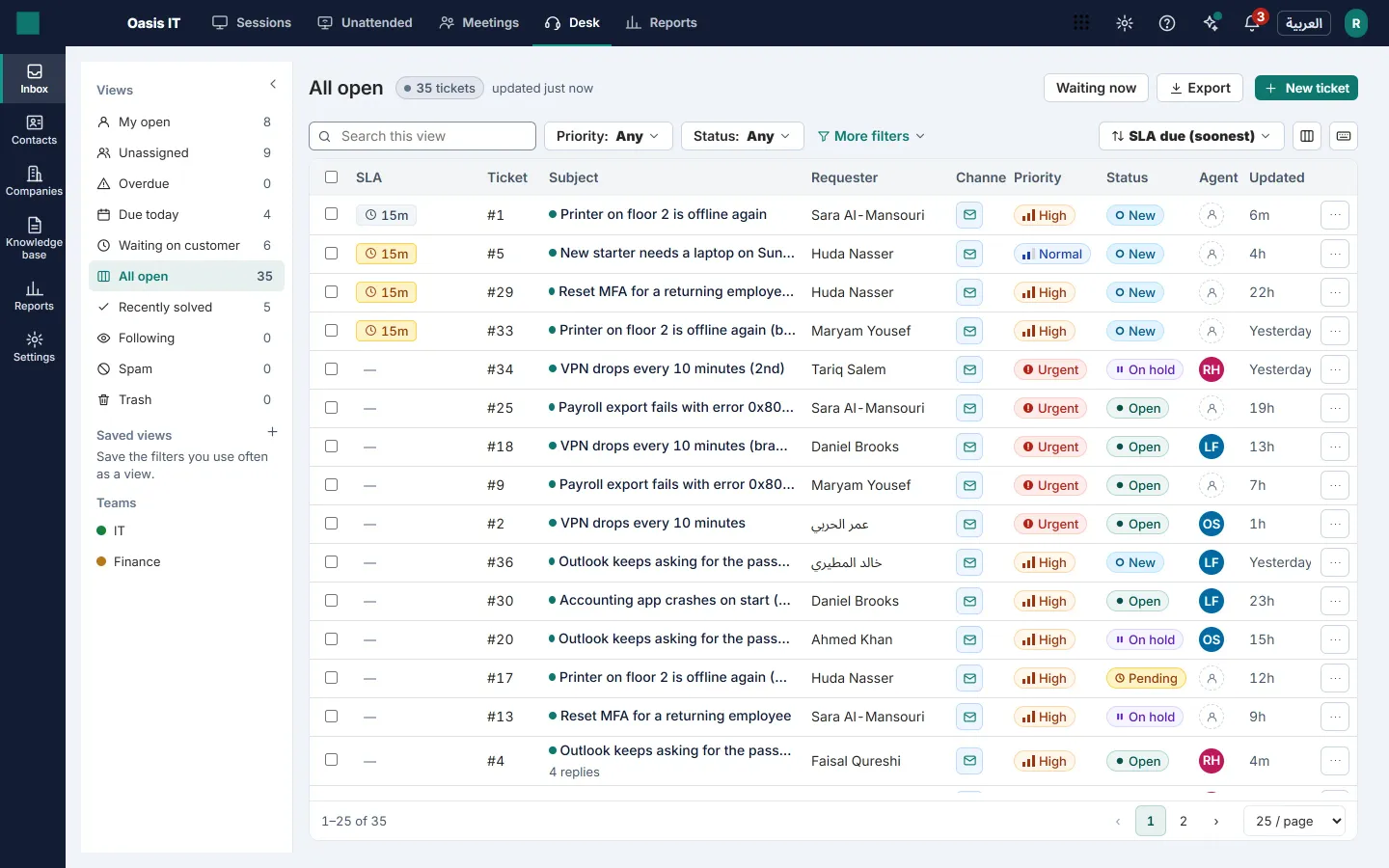
One inbox for every request
Email, your help center, web forms and the website widget all become tickets in one shared inbox.
- Forward your support mailbox and every email becomes a ticket; replies thread back into it.
- Six clear statuses: New, Open, Pending, On hold, Solved and Closed.
- Saved views, bulk actions and keyboard shortcuts for a busy queue.
- See when a colleague is already on a ticket, so two people never answer the same customer.
- Tags, custom fields, CC and followers, merge and linked tickets.
A help center in your brand
Your customers find answers, submit requests and follow them, in Arabic or English.
- A knowledge base with categories, Arabic and English versions, review before publishing and feedback.
- Customers sign in with a code sent by email to see and reply to their requests.
- Your logo and accent color — and, on Desk Professional, a custom domain for your help center.
- A short satisfaction survey after each solved ticket.
SLA policies on your working week
Set response and resolution targets per priority, counted on your business hours.
- SLA targets for first response, next response and resolution.
- Business hours from Sunday to Thursday out of the box, with Gulf public holidays.
- The clock pauses while you wait on the customer, and escalations fire before a breach.
- Every ticket shows the time left — or how late it is — at a glance.
Automation that keeps the queue moving
Rules act on events and on time, so routine work happens without anyone remembering it.
- Assign new tickets round-robin or by current load, per department.
- Rules on events and on time: set fields, add tags, notify, remind, close.
- Macros apply several actions and a reply in one click; canned replies in Arabic and English.
- Optional AI assist, off until you switch it on: tag suggestions from your own tags, sentiment and urgency your rules can act on, and reply drafts from your published articles — an agent reviews every one before it is sent.
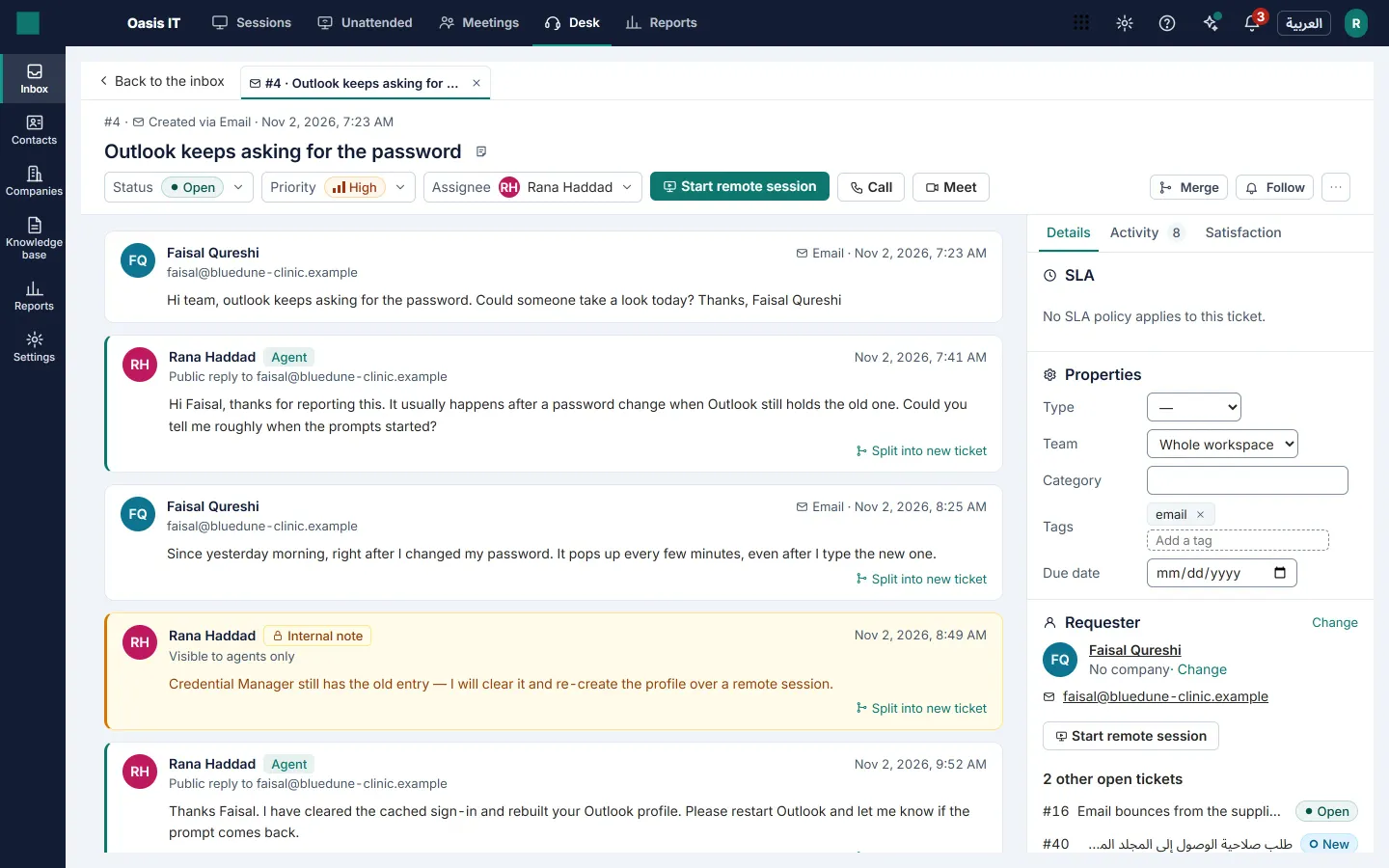
From ticket to remote session in one click
Desk is part of Telvory, so remote support is not a second product or a second login.
- Start an attended or unattended remote session straight from the ticket.
- The customer's device is linked to the ticket, and the session summary is posted back to it.
- With Telvory Meetings, call or schedule a meeting with the requester from the same ticket.
Reports that show what is working
Dashboards built from every ticket event, filtered by team, agent, channel and priority.
- Backlog, created versus solved, first response and resolution times.
- SLA compliance per team and satisfaction scores with their comments.
- How many tickets were solved with a remote session.
- CSV export that opens correctly in Arabic.
Arabic first, not translated later
Agents and customers each work in their own language, with right-to-left layout done properly in the inbox and the help center.
- Emails and the help center follow the customer's language.
- Hijri date labels shown beside Gregorian dates in reports.
- Prices in Saudi riyals on one invoice with the rest of your Telvory plan.
Desk pricing
Per agent. Choose one tier for your workspace; add or remove agents at any time.
Telvory Desk Starter
SAR 69 per agent / month
Or SAR 690 per agent, paid yearly.
- 2 support mailboxes
- 10 custom fields
- 1 SLA policy
- 1 business-hours calendar
- 10 automation rules
- Round-robin assignment
Telvory Desk Professional
SAR 119 per agent / month
Or SAR 1190 per agent, paid yearly.
- 10 support mailboxes
- 50 custom fields
- Unlimited SLA policies
- Unlimited business-hours calendars
- Unlimited automation rules
- Load-balanced assignment
- Article review and versions
- White-label help center
- A custom domain for your help center
- Your own satisfaction survey questions
- Custom reports with scheduled exports
- Ticket webhooks
Telvory Desk Enterprise
SAR 189 per agent / month
Or SAR 1890 per agent, paid yearly.
- Unlimited support mailboxes
- Unlimited custom fields
- Unlimited SLA policies
- Unlimited business-hours calendars
- Unlimited automation rules
- Skills-based assignment
- Article review and versions
- White-label help center
- A custom domain for your help center
- Your own satisfaction survey questions
- Custom reports with scheduled exports
- Ticket webhooks
- 5 times the standard API rate
- Try Telvory Desk Professional free for 14 days with 3 agents — no card needed.
- Colleagues who only read tickets and add internal notes are free and unlimited.
- Every Telvory plan keeps the service queue it has today: tickets, the help center intake form, the widget and canned replies.
- Prices exclude VAT.
Included and add-ons
Included
Comes with every Desk tier at no extra cost.
- Instant (attended) remote sessions
- Relay allowance per month: 5 GB
- Who may start a remote session: Desk agents
- Longest remote session: unlimited
- Concurrent remote sessions: at least 1
Add-ons
Add these on top, on any plan, when you need them.
- Remote support: from SAR 69 / month
- Meetings & Webinars: from SAR 55 per host / month
Notes on included hours, packs and overage
- A relay allowance carries a connection when a direct one is not possible. Using it up costs nothing: sessions then use direct connections only.
- Prices exclude VAT.
Not in Desk yet
We list what Desk does not do today, so you can plan around it.
- WhatsApp, SMS and phone channels.
- Live chat on your website.
- Asset management, problem and change workflows.
Write to the Telvory Desk team
Questions about Desk go straight to the people who build and support it.
Questions
Is Desk a separate product with its own login?
No. Desk is part of Telvory: the same sign-in, the same workspace and one invoice in Saudi riyals with the rest of your plan. From a ticket you can start a remote session with the requester.
Which channels does Desk handle today?
Email and requests from your help center. WhatsApp, SMS, phone and live chat on your website are not in Desk yet — the page lists them under “Not in Desk yet”.
How are SLA targets counted?
On your business hours — Sunday to Thursday out of the box, with Gulf public holidays. The clock pauses while you wait on the customer, and escalations fire before a breach.
Who needs a Desk seat?
Each agent who answers tickets. Colleagues who only read tickets and add internal notes are free and unlimited.
Is the AI assist switched on for me?
No. It is off until you switch it on, and an agent reviews every suggested reply before it is sent.
Also in Telvory
Remote Support
Reach any screen your customer allows — or any enrolled machine, with nobody there.
Explore Remote SupportMeetings & Webinars
Meet clients and present webinars from the same console — guests join from a browser.
Explore Meetings
See it on your own machines
Create a free workspace and run an attended session in minutes, or talk to us about a larger fleet.